
How to generate the CDSL TPIN required to authorise sales from my holdings?
Central Depository Services Limited (CDSL) is a depository, which is a financial institution that holds and manages securities, such as stocks and bonds, in an electronic form on behalf of investors. The CDSL Transaction Personal Identification Number (CDSL TPIN) is a secure, 6-digit PIN provided by CDSL to the investor. TPIN is used to authorise the sale of shares held in a demat account through online trading platforms. TPIN is part of a security measure introduced by CDSL to ensure that the demat account holder explicitly authorises the debit of shares from their account before they can be sold.
Key Features of CDSL TPIN:
- Authorization for Selling Shares:
The TPIN is required to authorise CNC (Cash and Carry) or non intraday sell transactions in the cash segment. Before the shares can be debited from your demat account and sold, you must provide this TPIN. - Security Measure:
The TPIN adds an extra layer of security to your trading account, ensuring that only you can initiate the sale of shares. This authority can be given by sale of specific shares, or generally for any shares in your demat account. - TPIN Validity:
The generated TPIN authorization expires at the end of the trading day on which it was generated, regardless of the time of verification.
How to generate the TPIN through the Broker's Trading Platform
- Go to the Holdings section in your trading app
- Look for an "Authorise" or "CDSL TPIN" option
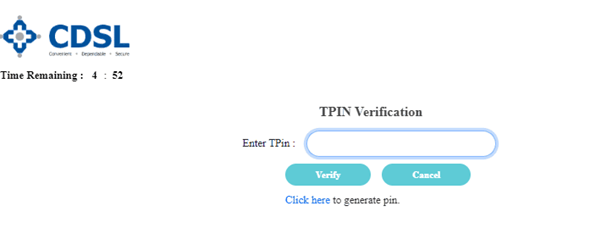
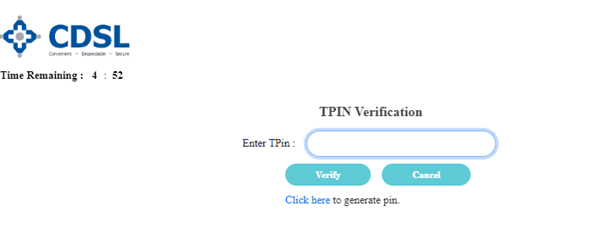
- Tap on "Click here to generate pin"
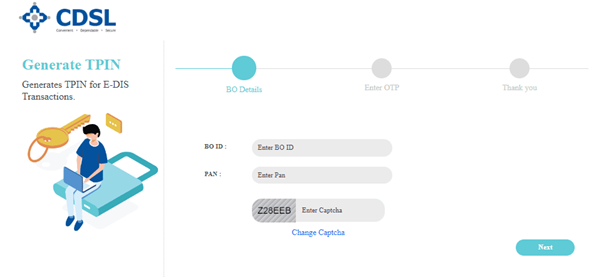
- Enter your 16-digit demat account number (BO ID unique 16-digit number assigned to your demat account, You can find your BO ID in your demat account statement, online through your broker's portal in demat account details, or by contacting your broker or Depository Participant ), PAN Number, Enter captcha and click "Next"
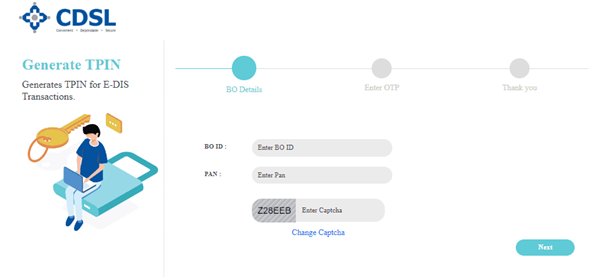
- Enter the OTP received on your registered email and mobile
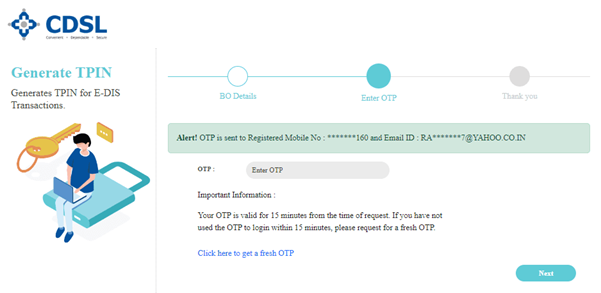
- Click "Next" again
- Your new TPIN will be sent to your registered contact details
How to generate the CDSL TPIN through the CDSL Website
- Visit the CDSL website at edis.cdslindia.com/home/generatepin
- Enter your 16-digit demat account number (BO ID unique 16-digit number assigned to your demat account, You can find your BO ID in your demat account statement, online through your broker's portal in demat account details, or by contacting your broker or Depository Participant ), PAN Number, Enter captcha and click "Next"
- Enter the OTP received on your registered email and mobile
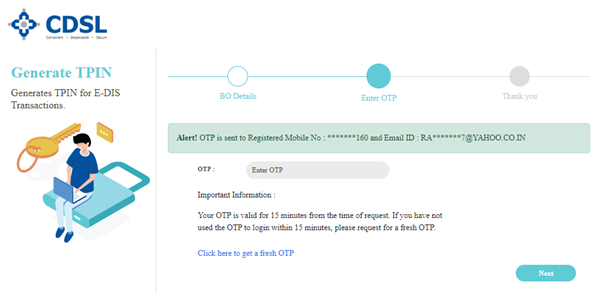
- Click "Next" again
- Your new TPIN will be sent to your registered contact details
Key points:
- The CDSL TPIN is required only for selling securities from your holdings, not for purchase transactions
- Once a TPIN is generated, it does not expire unless you reset it. The TPIN authorization for holdings is valid only on the trading day until 3:30 p.m. This means that after you verify your holdings using the TPIN, the authorization remains effective only until the end of the trading day. You will need to re-verify your holdings using the TPIN again to execute any further transactions on the next day
- The TPIN authorises your broker to debit specific shares or the entire portfolio for the same trading day from your demat. You can cancel this anytime.
- If you forget your TPIN, you can re generate it at any time by Ab the steps listed above for generating a TPIN


